Purchase requests
The first link in the chain: why a badly filled purchase request costs you twice
In procurement, mistakes do not stay where they are made. A quantity typed wrong, a missing delivery date or the wrong currency on one line travels through every document that follows. A badly filled request is paid for twice: once at the order, and again at the receipt.
The request feeds everything that follows
In Millisave, the purchase request is the first step of the source-to-pay chain: request, approval, e-sourcing, order, then receipt, invoice and payment. Everything entered in the request is carried forward as it is: items, quantities, units, estimated prices, delivery place and delivery date. Nobody re-types it later, which is exactly why it has to be right the first time.
Two kinds of request
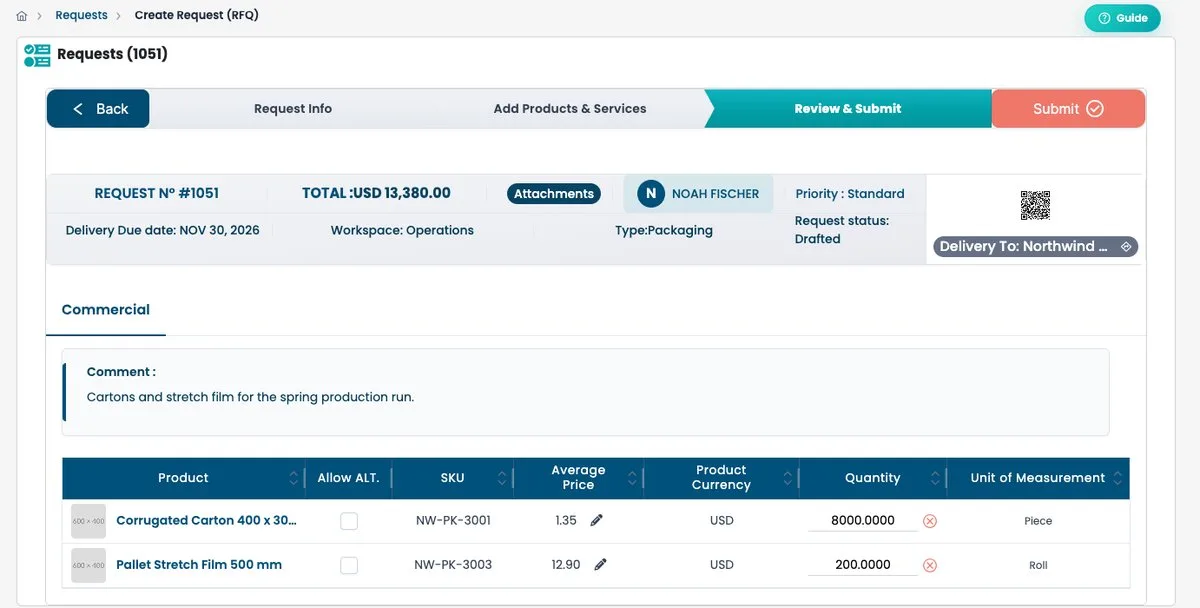
- Request for quotation (RFQ): the need is defined and you are looking for a price. The wizard has three steps: request information, add products and services, review and submit.
- Request for proposal (RFP): the need is open and you expect suppliers to propose a solution. The wizard adds a technical requirements step in second position.
Know where your request stands
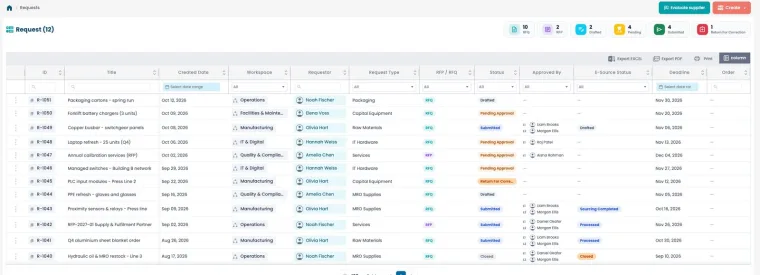
A request moves through clear statuses, and what you can do depends on each one:
- Drafted: created but not submitted. You can edit, delete or duplicate it.
- Pending approval: submitted and being validated. You can only duplicate it.
- Submitted: handled by the purchasing process.
- Returned for correction: sent back by an approver, and editable again.
The request page also shows a timeline, so you can follow the approval without chasing anyone by email.
The total is only as good as each line
On the review step, the total is the sum of price times quantity on every line, and it recalculates whenever you change either one. This is your last useful check. Look at three things before you submit:
- Quantities: they show four decimals, so a stray 1.0002 is easy to spot here and painful to fix later.
- Currency per line: each line has its own currency. Make sure none was left on the wrong one.
- Duplicate lines: a product added twice doubles the order.
Allow equivalents when it makes sense
Each line has an option to accept an alternative product. Ticking it lets suppliers propose an equivalent, which widens competition and often brings a better price. Leave it unticked only when the exact reference matters, for compatibility or certification.
A checklist for requesters
- Give the request a title a buyer will understand without opening it.
- Set a realistic delivery date and the exact delivery place.
- Prefer catalog items over free text whenever they exist.
- Check quantities, units and currency on the review step.
- Attach specifications or photos when the item is unusual.
Five minutes of care at the request saves hours at the order, the receipt and the invoice.