Purchase requests
Four ways to add items to a purchase request, and when to use each
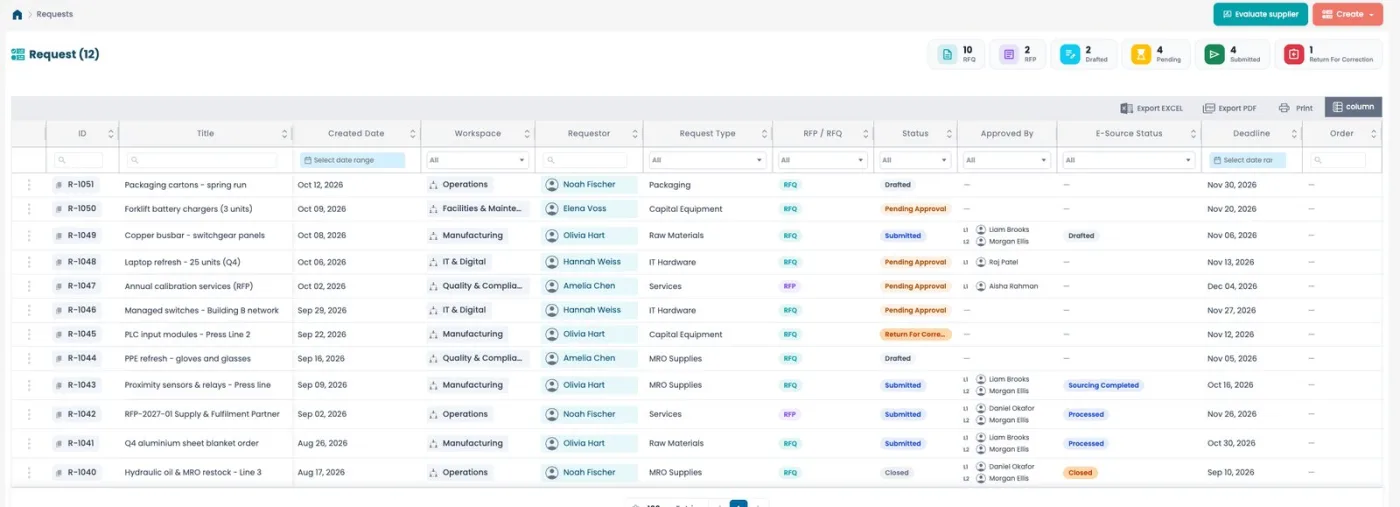
The slowest part of a purchase request is usually the item list. Millisave gives requesters four ways to add items, and each one fits a different situation. Picking the right one is the difference between a two-minute request and a twenty-minute one, and between clean data and a buyer who has to call you back.
1. Products and catalogues
Search your company's product catalog, add items to a cart and adjust the quantities there. This is the default and the best option whenever the item exists in the catalog: the product reference, unit and average price come with it, so the buyer and the order inherit clean data.
Use it for: anything you buy regularly, consumables, spare parts with a known reference.
2. Add manually
Describe an item that is not in the catalog: name, quantity, unit and an estimated price. The product reference stays empty, which is normal for a manual line.
Use it for: one-off purchases and new items. If you find yourself adding the same manual item every month, ask for it to be added to the catalog instead.
3. From the system
Start from items already known to your stock. This is the fastest route for warehouse and maintenance teams who reorder what they manage every day.
Use it for: replenishment and stock-driven needs.
4. Marketplace
Browse suppliers' catalogues and add their items directly. It is useful when you know what you want but not who sells it, or when you want to compare what suppliers offer before sourcing.
Use it for: discovering new suppliers and products outside your own catalog.
Small features that save time
- Duplicate a line when you need the same item in another size or for another delivery.
- Edit the average price directly in the review table, without going back a step.
- Duplicate a whole request to reorder last month's list in one click, even after it has been submitted.
Read the list like a manager
The request list opens with counters for each type and status: RFQs, RFPs, drafts, pending approval, submitted and returned for correction. A growing pile of returned requests usually means requesters need a clearer catalog or a short guide. A growing pile of pending ones means the approval circuit is the bottleneck.
The rule of thumb
Catalog first, stock second, marketplace to discover, manual as the exception. The more of your requests come from the first two, the faster your buyers can source and the cleaner your spend data becomes.