Budget
Splitting a budget by workspace and expense account so teams can use it
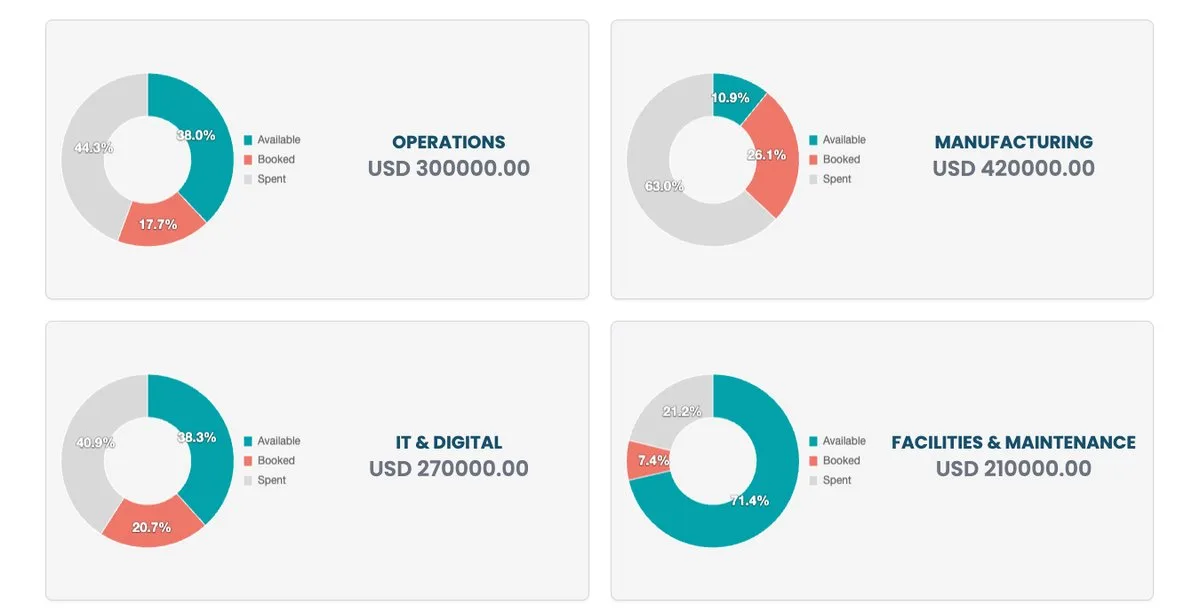
A company-wide budget of one million tells nobody what they can spend this month. Control starts when the envelope is split into amounts that match how teams really buy: who spends, and on what.
One line, one crossing
In Millisave, a budget is split along two dimensions: the workspace, which is the team or entity that buys, such as operations, maintenance, HR or purchasing; and the expense account, which is what the money is spent on. Each allocation line is one crossing of the two, with its own amount. Requests and orders from that workspace then consume the matching line.
How the split is done
The split is set from the workspace side, which surprises people the first time:
- Create the budget with its name, currency and dates. Its total starts at zero.
- Open the workspace and go to its Budget tab.
- Authorise the budget for that workspace, then select the budget to attach.
- Add an expense account with its amount. Repeat for each account the team uses.
Once the lines exist, the budget page fills in: the summary shows the totals, the details tab shows the structure of the split, and each department gets its own view of available, booked and spent amounts.
Design the split around decisions
- Match workspaces to approvers. If one manager approves a team's purchases, that team should be its own workspace.
- Keep expense accounts few and clear. Five accounts a requester understands beat twenty that only finance can read.
- Start with history. Base each line on last year's real spend, then adjust for known changes.
- Keep a small reserve unallocated or in a dedicated line, so urgent needs don't break a team's envelope.
Read the department view every week
The department view is where control actually happens. A ring that is mostly booked tells you a team has committed its money even if little has been paid yet. Review it weekly with each budget owner, and agree on reallocations before teams run out rather than after.
Why it pays off
When each team sees its own available amount, approvals get faster, because the answer to "can we afford it?" is on the screen. And finance stops being the department that says no at month end, because the guardrail was in place before the money moved.