Budget
A budget is a guardrail before the spend, not a report after it
In many companies, the budget is a spreadsheet that finance compares with the accounts at the end of the month. By then the money is gone. A budget that only reports overspend after the fact is accounting. A budget that sits in front of the spend is control.
The equation to remember
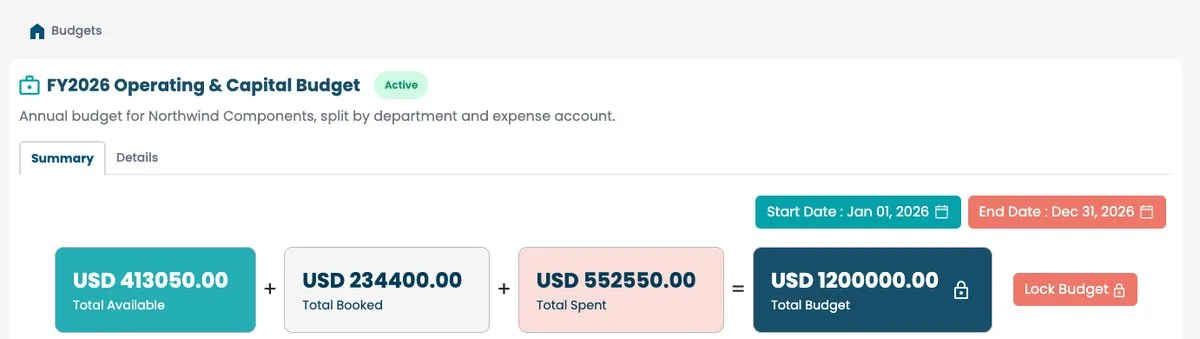
A Millisave budget is read through one equation:
Available + Committed + Spent = Total budget
- Total budget is the envelope you allocated.
- Committed is what open orders have already reserved.
- Spent is what has been invoiced and paid.
- Available is what is really left to use.
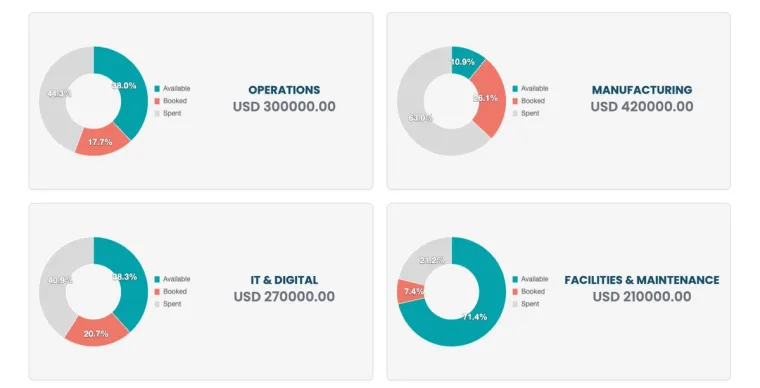
The same logic applies on every line of the split: what is available equals the line's budget minus what is reserved minus what is spent.
Requests and orders consume the envelope
A budget is created empty. Amounts are then allocated to the places where money is spent, and from there the purchasing flow consumes them: orders feed the committed amount, which becomes spent once invoiced. Because this happens as purchases move through Millisave, the budget shows the real position before the invoice arrives, not after.
Read "committed" carefully
Committed money is the most useful number on the screen and the most misunderstood. It is money you have not paid yet but have already promised. A department that looks healthy on spend can be fully committed. Always look at available, not at spent, before approving a new request.
A practical note: the committed total can show a negative value after commitment adjustments, for example when an order is corrected. It is not a typing error, but it is worth understanding before you justify what is available.
Two statuses, kept simple
A budget is either Active, which is its status at creation and means it can be used, or Locked, set from the budget page when you want to freeze it.
Set it up right from day one
- Choose the currency carefully. It is set when the budget is created (TND, EUR, USD, GBP or SAR) and cannot be changed afterwards.
- Name budgets so anyone understands them, for example by year and scope.
- Set start and end dates that match your planning cycle.
- Split the envelope by the teams and expense types that actually spend it.
The habit that changes everything
Make "check available" part of every approval. When approvers see what is left before they validate a request, overspend stops being a month-end surprise and becomes a decision someone made with open eyes.