CRM
Why your sales forecast drifts, and how stage probabilities keep it honest
Ask five sales reps how likely their deals are to close and you will get five different scales of optimism. Add those guesses together and you have a forecast that reflects confidence, not reality. The fix is not a better spreadsheet. It is taking the guess out of the probability.
Probability belongs to the stage, not the rep
In the Millisave CRM, an opportunity's probability is not typed in by the salesperson. It comes from the pipeline stage the deal sits in. Each pipeline is configured in the CRM settings with its stages, and every stage carries a probability and a target cycle time. Move a deal to the next stage and its probability updates on its own.
This does two things. Every deal in the same stage is weighted the same way, whoever owns it. And arguing about the forecast becomes arguing about stages, which is a conversation about evidence: has the customer seen the offer, or not?
Weighted value: the number that matters
A deal worth 100,000 at 20% probability is not worth 100,000 to your forecast. The CRM computes a weighted value for each opportunity from its amount and its stage probability, and adds those up across the pipeline. That weighted total is what you compare against your target.
Read the executive summary first
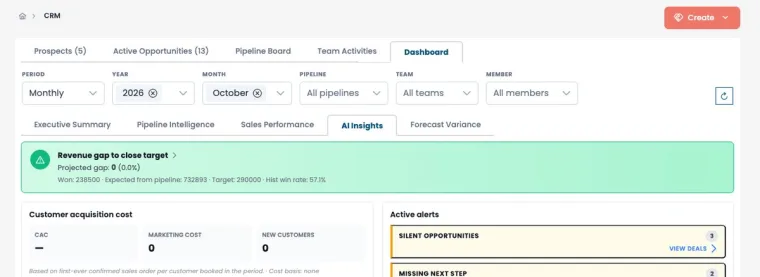
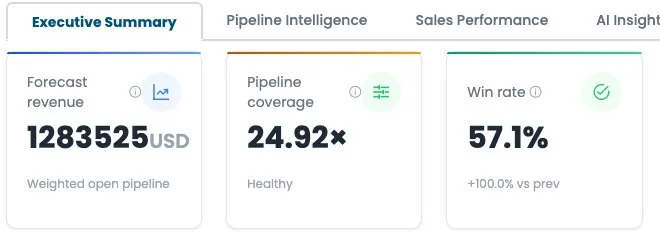
The CRM dashboard opens on an executive summary with the indicators a sales manager needs before the Monday meeting: forecast revenue, pipeline coverage against target, conversion rate, average sales cycle, revenue against objective and forecast accuracy. Other tabs go deeper into pipeline intelligence, sales performance, AI insights and the forecast gap.
Let the AI point at the deals that are slipping
The AI insights tab raises alerts on the opportunities that usually kill a forecast quietly:
- Silent opportunities with no recent activity.
- Missing next step, where nobody has planned what happens next.
- Stuck in stage, where a deal has stayed longer than the stage's target cycle.
Each alert links straight to the deals concerned, so the review meeting becomes a list of actions rather than a round of updates.
Set up pipelines that match how you really sell
- One pipeline per sales motion. A distributor deal and a project tender do not move through the same stages.
- Define each stage by a customer action, such as "demo completed" or "offer sent", not by a rep's feeling.
- Start probabilities conservative and adjust them once you have a quarter of real history.
- Use lost reasons. The CRM records why deals are lost; that list is your best input for next year's pipeline design.
The forecast meeting, rewritten
With probabilities tied to stages and AI alerts on stalled deals, the weekly forecast becomes three questions: which deals moved stage, which deals are flagged, and is weighted coverage enough to hit the target? Everything else is detail.